Direct connection
Through your networkEveryday services
Services on a direct route use your phone's ordinary connection, outside the VPN.
Connection checked October 5
A VPN for everyday life.
Turn LAMPA on with one tap. It picks a server and shows you when the connection is ready.
from 499 ₽ a month 100% refund within 7 days, on request to support
Download the app iPhone: on the App Store
Everything you need to connect is in one app.
Open the app and turn LAMPA on. The connection status is on the main screen.
LAMPA can split connections: some services go direct, the rest go through the VPN.
Services on a direct route use your phone's ordinary connection, outside the VPN.
For the rest of your traffic the app uses the VPN connection. You can pick the country by hand or leave it on automatic.
Choose what you want to do and see how LAMPA helps.
Decide which country to connect to.
Leave the choice to LAMPA or set the country by hand.
Find out whether the connection worked.
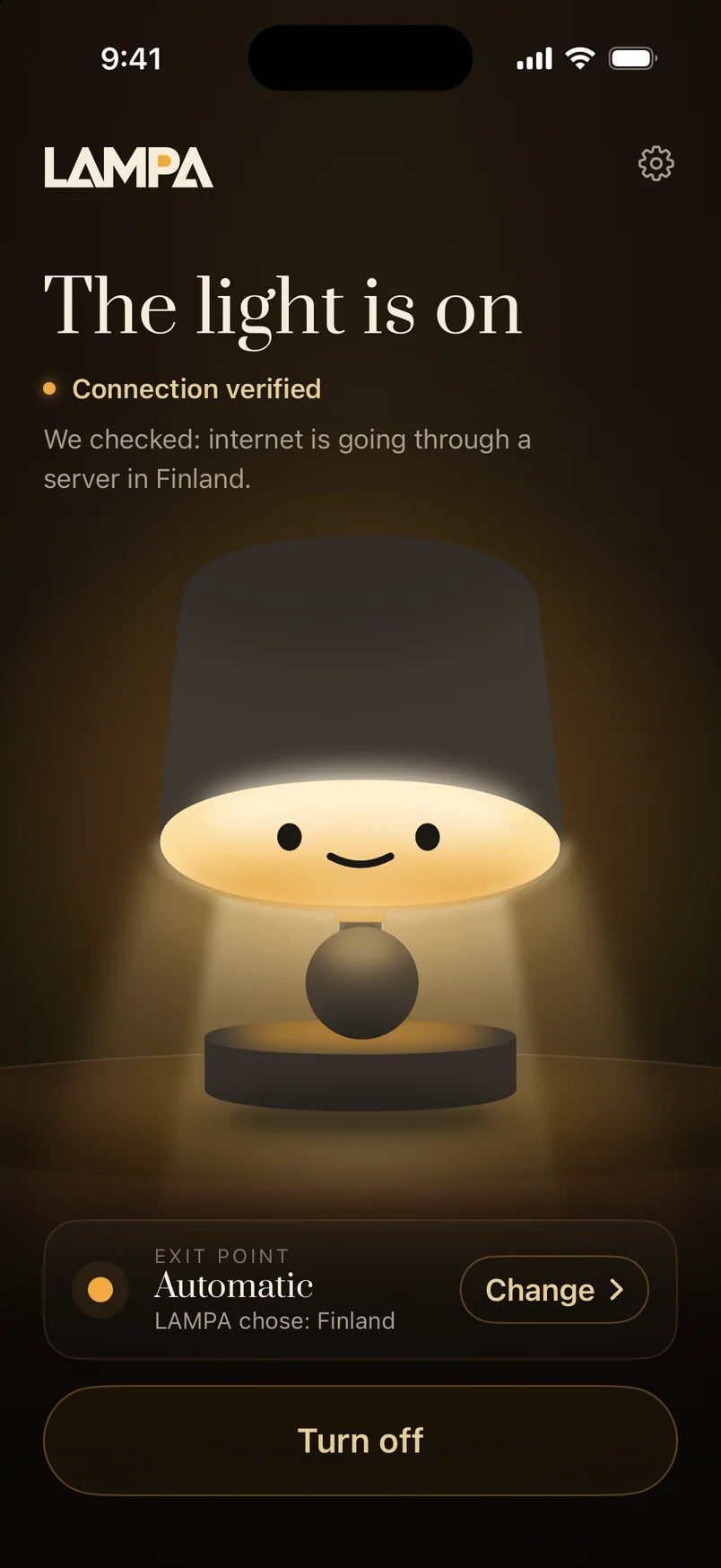
LAMPA lights up once the connection is checked. You see the status on the main screen.
Add your family's phones to the subscription.
Manage devices and invitations in the app.
A week, a month or a year. Pay by bank card or SBP.
It appears on screen right after payment and arrives by e-mail.
Android: on Google Play. iPhone: on the App Store.
Enter the code in the app and allow the VPN when your phone asks. LAMPA picks the country for you, or you can choose one by hand.
LAMPA shows what is happening with the connection: a check, a ready connection or another attempt. The light is your main guide.
The internet works as usual. Turn the lamp on when you are ready.
You turned it off. It is resting.
Checking the connection before turning the light on.
Checking, not waiting.
Checked: the internet goes through our server.
Connection checked
There is a connection, but the exit could not be checked. Try another country.
Exit not confirmed
The connection dropped. You do not need to do anything. The lamp will reconnect by itself.
This usually takes less than a minute
This server is not answering right now. The lamp is already connecting to another one.
This usually takes less than a minute
The ordinary internet works. The problem is not there.
We turn the light on only after a check, not just after connecting.
You can leave the server and settings to LAMPA. It checks the connection and shows its status.
Everything you need is on the main screen
We do not keep your browsing history or the contents of VPN traffic. How access data, payments and support requests are handled is described in the privacy policy.
| Browsing history | We do not keep a list of the sites you open through the VPN. |
|---|---|
| VPN connection addresses | We keep no log of the addresses or destinations of VPN traffic. |
| VPN session history | We keep no log of when VPN sessions start or how long they last. The day a device was last active may appear in the device list. |
| Login and password | You do not need an account to connect. Access is added with a code or an invitation. |
| Card details | You enter them on the payment page. The payment is processed by the payment provider. |
| Ads in the app | There are no ads in the app. |
| Access and devices | The app confirms your subscription and receives the connection settings. That is how you manage your devices. |
|---|---|
| Payment and support | To issue your code and to help you, we use the order details and the contact details you give us. |
Details on how data is handled are on the «Privacy» page.
Install it from Google Play like any other app. Updates arrive by themselves.
Install it from the App Store like any other app. Updates arrive by themselves.
Write to us if you have a question, and we will answer to the point.
The app offers automatic and manual choice. The diagram shows an example: the delay values are illustrative.
You can change how the country is chosen in the app.
Choose the term and the number of devices. LAMPA works the same on every plan.
To get to know LAMPA.
+89 ₽ — each additional device
SubscribeFor everyday use.
+250 ₽ — each additional device
SubscribeThe lowest price per month.
+2,190 ₽ — each additional device
SubscribeOne seat is one device. You can add seats for your family and send them invitations.
Services on a direct route use your phone's ordinary connection, outside the VPN. Everything else goes through the VPN.
LAMPA is a VPN app with simple connection controls. It can choose a country automatically, check the connection and show your connected devices.
No. You do not need a login or a password to connect. After payment, the access code appears on screen and arrives at the e-mail address you gave.
LAMPA checks the connection first. The light comes on once the check succeeds.
LAMPA will try to restore the connection by itself. You see the current status on the main screen. If you need help, write to support.
Add the number of devices you need and send an invitation from the app. Your family member only has to install LAMPA and accept the invitation.
As many as you choose. One seat is one phone or tablet. The device list and invitations are in the app.
You can leave it on automatic or set the country by hand in the app.
By bank card or SBP on the payment page. Choose a week, a month or a year and the number of devices you need.